

See your Claude Code plan limits on the Linux desktop: how much of the 5-hour, weekly and per-model weekly (Fable) limits you’ve used, when each one resets, and whether you’re on pace to run out before it does. It shows only the limits your plan has: verified Ultra accounts have no 5-hour limit, so they see weekly and Fable instead. If you also use Codex or Antigravity, their limits appear alongside.
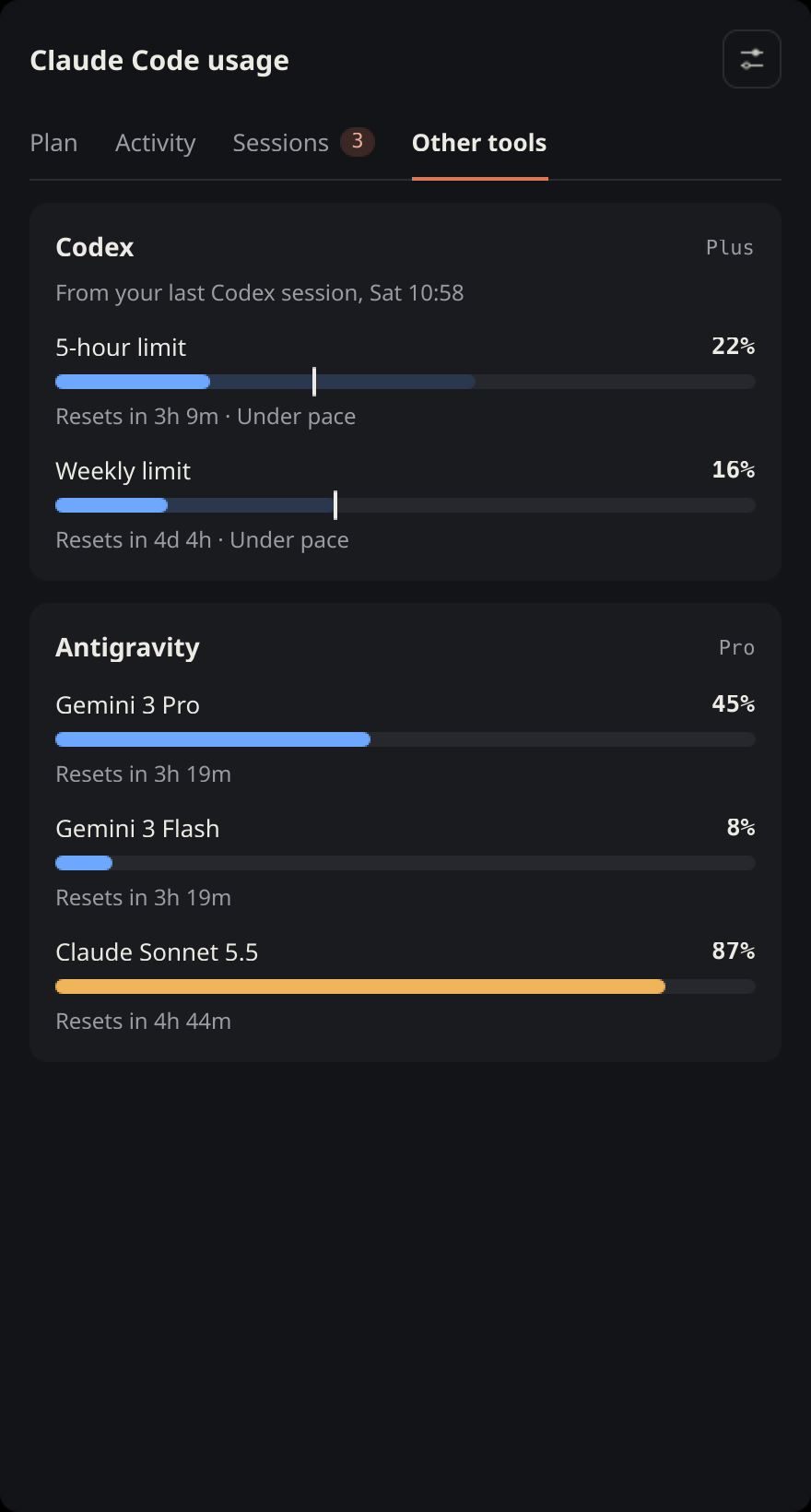
Screenshots use demo data.
Unofficial. This project is not affiliated with or endorsed by Anthropic. It reads an undocumented endpoint (
/api/oauth/usage) that Claude Code itself uses, which may change or disappear without notice.
It ships two independent front-ends over the same data:
| What it is | Pick it if | |
|---|---|---|
Plasma applet (plasmoid/) | Native KDE Plasma 6 panel widget with a full popup | You use KDE Plasma 6 |
Tray widget (usage_tray.py) | PySide6 system-tray icon and a small always-on-top overlay | You use any other desktop with a system tray |
Features
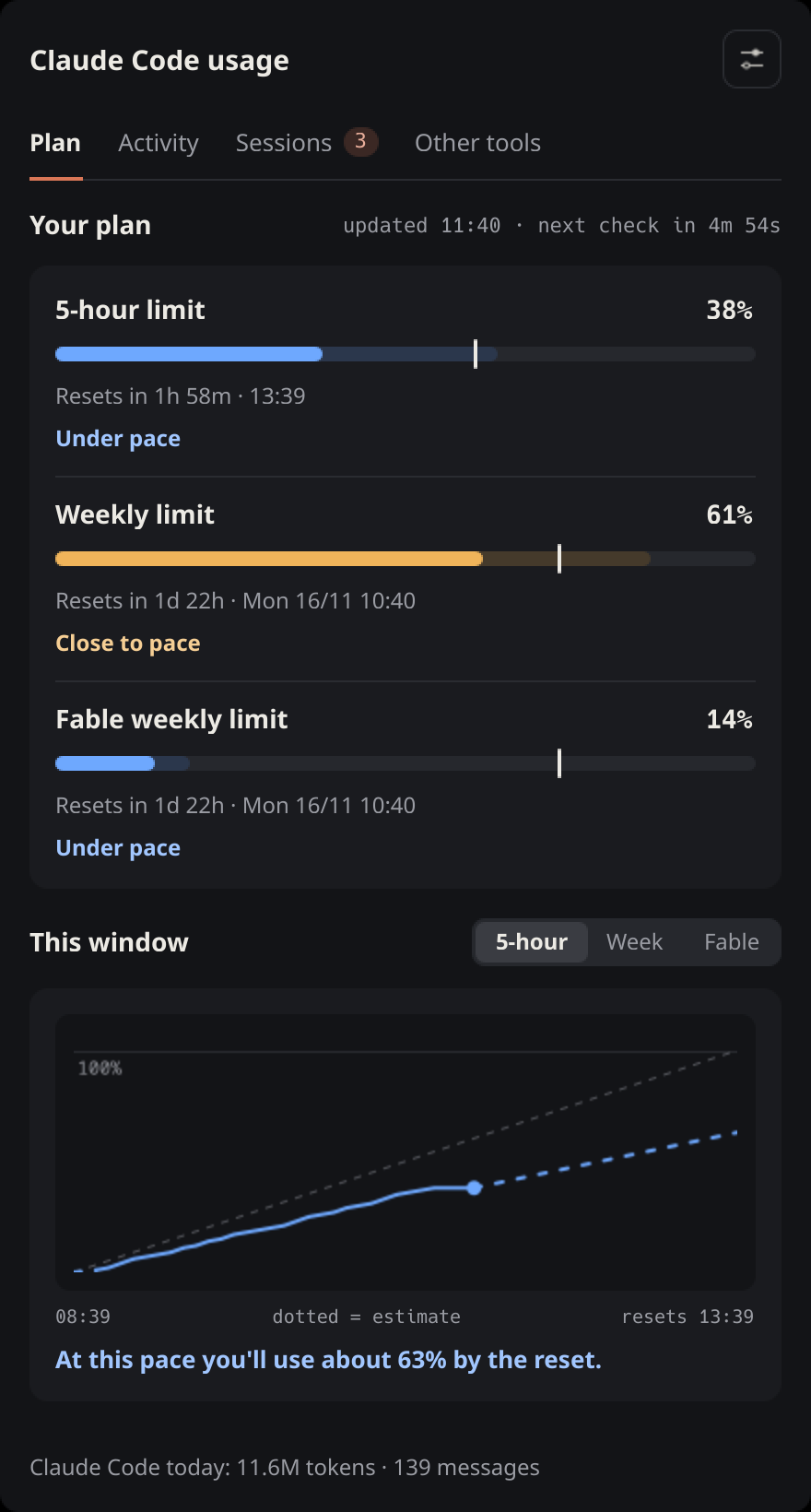
Colours follow the pace verdict, not the raw percentage: blue when you’re under pace, amber when you’re close, red when you’re on track to hit the limit before it resets. All three, and the orange accent, can be changed in the applet’s settings.
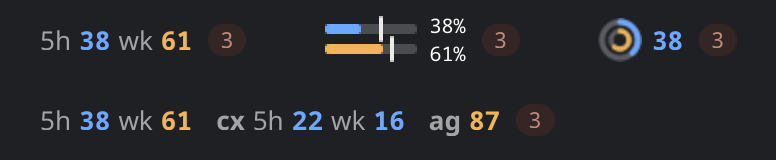
In the panel, your plan’s first two limits in one of three styles: Numbers
(5h 38 wk 61, or wk 24 fable 3 on Ultra), Meters (two small bars with an
even-pace tick) or Ring (two rings, square enough for a vertical panel).
Settings → Panel has a switch per tool: Claude (on by default), Codex (cx 5h 0 wk 16) and Antigravity (ag 87, its most-used model), so the panel shows any
mix. The widget dims when it’s showing a cached reading, and a pulsing count
appears while Claude Code sessions are working.
In the applet’s popup:
- Plan: every limit on your plan, each bar with an even-pace tick and a faded forecast of where you’ll be at reset, then a chart of the current window for any of them with a plain verdict (“At this pace you’ll use about 63% by the reset”).
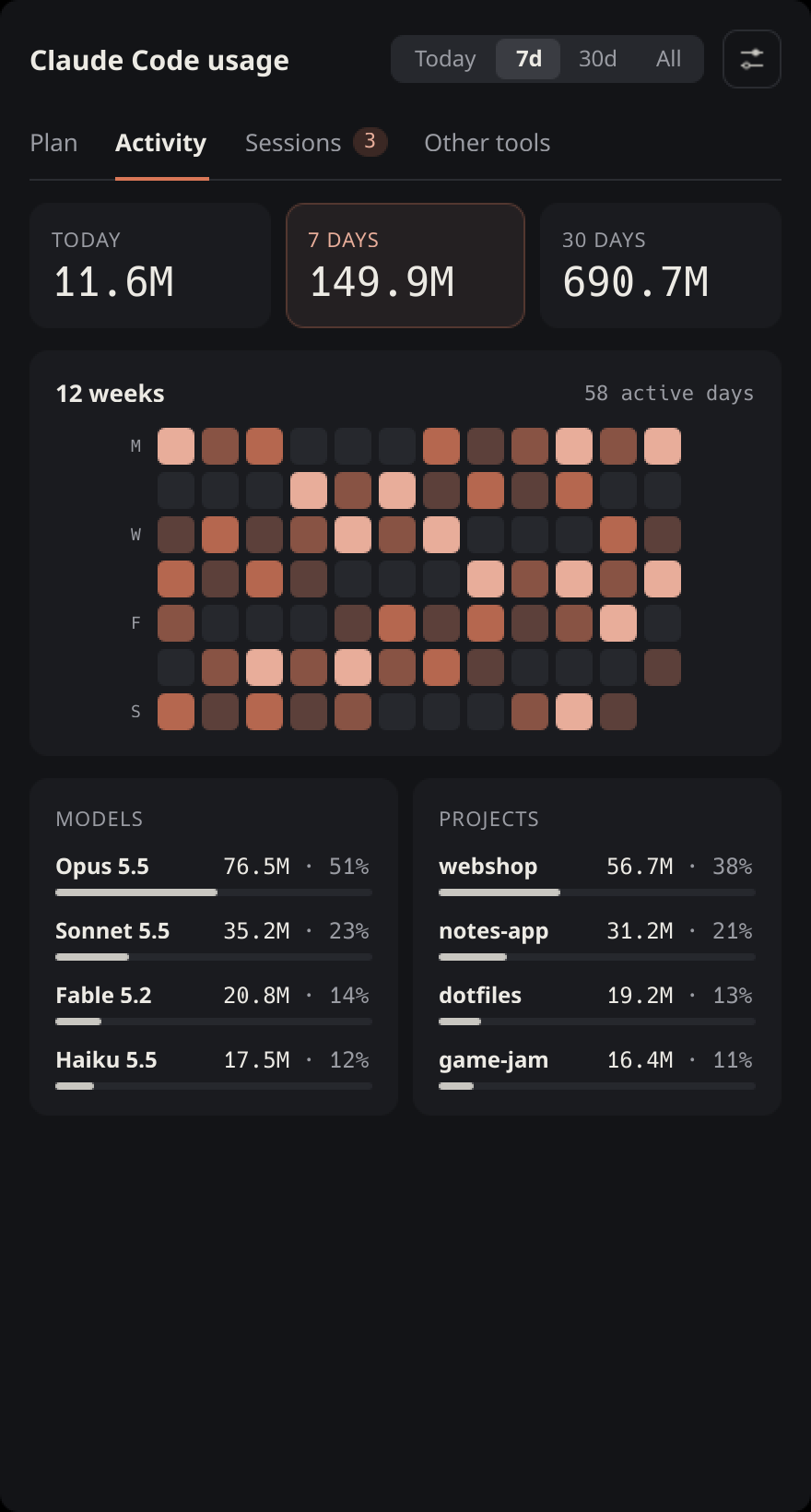
- Activity, read from Claude Code’s local logs on this computer: tokens for today, 7 and 30 days, a 12-week activity grid, and models and projects ranked by tokens for today, 7 days, 30 days or all time.
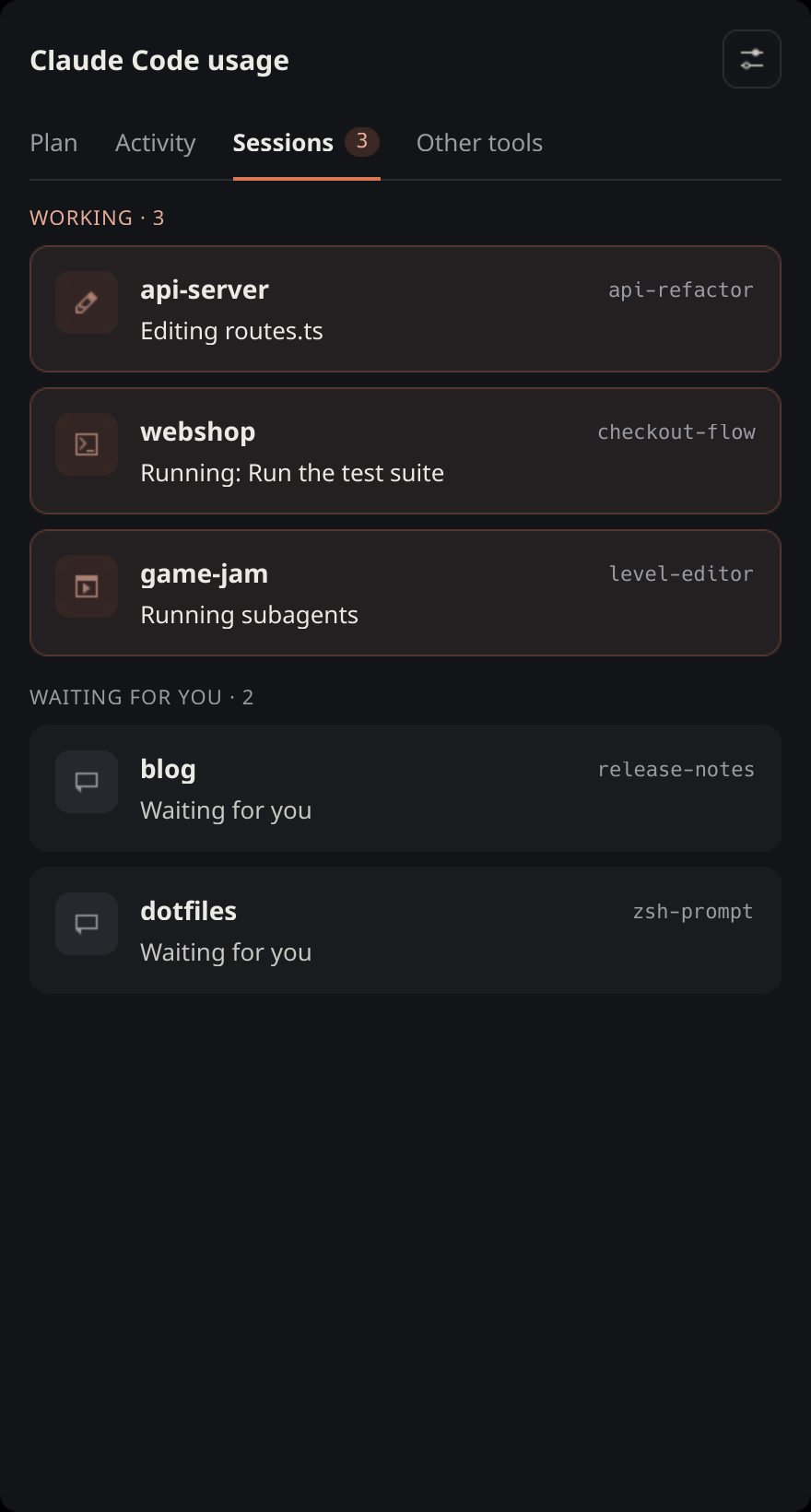
- Sessions: every running Claude Code session, working ones first, and what
each is doing right now (
Editing routes.ts,Running: <command>,Thinking,Waiting for you). - Other tools: plan limits of other AI coding tools on this computer. Codex: its 5-hour and weekly limits, read from Codex’s own session logs (as fresh as your last Codex turn). Antigravity: each model’s quota and reset, read from the running Antigravity app (open it to see them). The tray overlay and tooltip list these too.
- Desktop notifications when a limit crosses 75%, 90% or 100% (configurable), and when a window you were warned about resets.
- Plain-language errors: “Login expired: open Claude Code once to refresh it”, “Usage endpoint is rate-limiting: will retry on the next poll”, and so on, with the last good reading still on screen.
The tray widget shows the first limit’s percentage (5-hour, or weekly on Ultra) as its icon, coloured green to red, with every limit and their reset countdowns in the tooltip and the overlay. Left-click toggles the overlay; right-click has Refresh now, Show/hide panel and Quit.
Requirements
- Linux.
- Claude Code installed and signed in with a Claude subscription (Pro, Max, Ultra, Team or Enterprise). API-key logins have no plan limits, so there’s nothing to show.
- Python 3.11 or newer.
- Applet: KDE Plasma 6. No Python packages beyond the standard library.
- Tray widget: a desktop with a system tray. PySide6 (Qt 6 for Python) is used from your distribution, or installed automatically.
- Optional:
notify-send(packagelibnotify) for the applet’s desktop notifications. - Optional: Codex CLI signed in with ChatGPT, and/or Antigravity, for the Other tools tab. Gemini CLI isn’t shown: Google ended its personal tier in favour of Antigravity.
Install
git clone https://github.com/imdizmo/claude-usage-tracker.git
cd claude-usage-tracker
./install.sh applet   # KDE Plasma 6: the panel widget
./install.sh tray     # any other desktop: the tray widget
Both install for your user only, with no root needed. Run the same command again to update after pulling new changes.
Applet. Then right-click your panel, choose Add Widgets…, and drag Claude Code Usage onto it.
Tray. It starts at login from then on. To start it right away:
claude-usage-tray &It uses your distribution’s PySide6 if it’s installed (pacman -S pyside6,
apt install python3-pyside6.qtwidgets, dnf install python3-pyside6).
Otherwise the installer puts PySide6 in a private environment under
~/.local/share/claude-usage-tracker/ (about 260 MB).
To try the tray without installing anything, run python3 usage_tray.py from
the repository.
Configuration
Applet settings live in its own window: the gear icon in the popup, or right-click the applet and choose Settings…. Changes apply immediately.
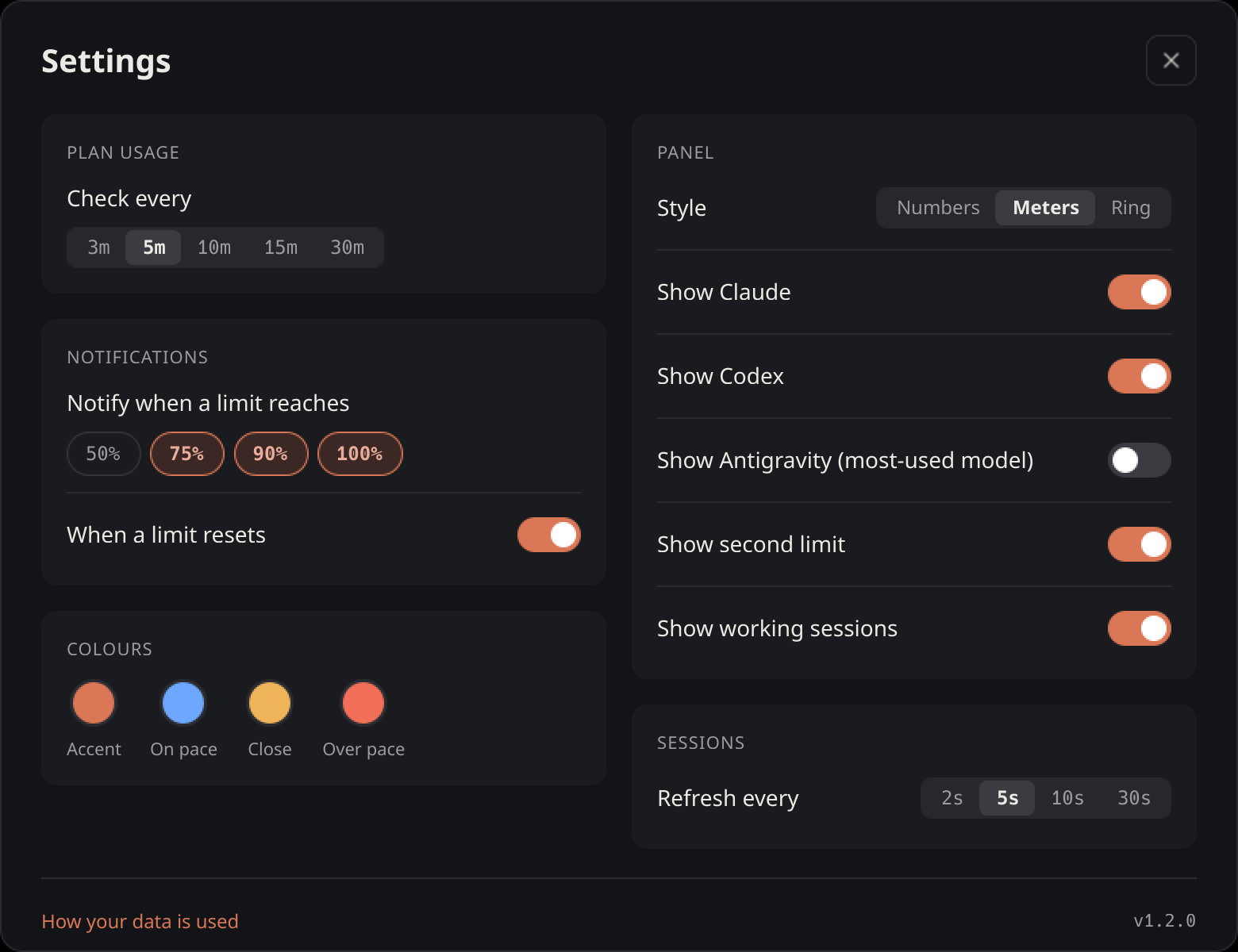
| Setting | Default | |
|---|---|---|
| Check plan usage every | 5 minutes | 3, 5, 10, 15 or 30 minutes. The endpoint rate-limits quickly; below 5 minutes you’ll see more cached readings. |
| Notify when a limit reaches | 75%, 90%, 100% | Any of 50 / 75 / 90 / 100%. |
| Notify when a limit resets | on | Only for windows you were warned about. |
| Panel style | Meters | Numbers, Meters or Ring. |
| Show Claude / Codex / Antigravity | on / off / off | Which tools the panel shows. Antigravity shows its most-used model. |
| Show second limit | on | In the panel, for Claude and Codex. |
| Show working sessions | on | The pulsing count in the panel. |
| Refresh session status every | 5 seconds | Local files only, no network. |
| Colours | orange accent; blue, amber, red | Accent, on pace, close, over pace. Click a swatch to pick; Reset to defaults undoes it. |
The tray widget has no settings. It checks every 5 minutes and leaves notifications to the applet.
How it works
Plan limits. Every few minutes it calls
GET https://api.anthropic.com/api/oauth/usage with the OAuth token Claude Code
already stores in ~/.claude/.credentials.json. There’s no API key and nothing
to log into: if Claude Code works on this computer, this works.
Rate limiting. That endpoint returns HTTP 429 if it’s polled too often. On any failure (429, offline, expired login) both front-ends show the last good reading, marked as cached, and keep the reset countdowns ticking from the cached reset times. If you run both, the tray reuses a reading the applet made in the last few minutes instead of making a second request.
Claude Code activity. The Claude Code tab reads the session logs in
~/.claude/projects/**/*.jsonl and the session files in ~/.claude/sessions/.
The first scan can take a few seconds on a large history. After that, only
newly appended lines are read.
Other tools. Codex writes its plan limits into its own session logs
(~/.codex/sessions/) with every turn; the Other tools tab shows the newest
reading, so it’s as fresh as your last Codex use. Antigravity’s quotas come
from the Antigravity app itself while it runs: the same local request its own
status bar makes, to its language server on 127.0.0.1. When Antigravity is
closed, the tab says so.
Privacy
-
Network: the only request that leaves your computer is the one above, to
api.anthropic.com. Antigravity’s quotas are read from the running app over127.0.0.1. There is no telemetry. -
Credentials:
~/.claude/.credentials.jsonis only ever read, never written, copied or logged. -
Stored locally: in
~/.cache/:claude-usage.json: the last usage reading.claude-usage-state.json: a week of usage readings and which alerts were sent.claude-usage-stats.json: per-day token counts by model and project folder name, plus how far each log file has been read.
Conversation content is never stored. Delete these files at any time to reset history, alerts and the log scan.
Troubleshooting
| You see | What to do |
|---|---|
| Claude Code isn’t signed in on this machine | Run claude and log in. |
| No Claude.ai login in ~/.claude/.credentials.json | You’re signed in with an API key, which has no plan limits. Log in with a Claude.ai account instead. |
| Login expired: open Claude Code once to refresh it | Start Claude Code once. The widget re-reads the token on every check and recovers on its own. |
| Usage endpoint is rate-limiting | Nothing; it retries on the next check. If it happens often, check less frequently. |
| Numbers dimmed, “Showing the reading from HH:MM” | A cached reading is being shown. The reason is shown next to it. |
| Tray: No system tray available | Your desktop has no system tray. On GNOME, install the AppIndicator extension. |
| Tray overlay in the wrong place on Wayland | The tray runs under XWayland (QT_QPA_PLATFORM=xcb) so it can position the overlay. Drag it where you want it. |
Uninstall
./install.sh uninstallThis removes the applet, the tray, its launcher and its autostart entry. Your
cached readings are kept; delete them with rm -f ~/.cache/claude-usage*.json.
Development
plasmoid/
  metadata.json            applet metadata
  contents/code/fetch.py   all data work: API, cache, alerts, log scan, live sessions, other tools
  contents/config/main.xml settings and their defaults
  contents/ui/             QML: main.qml (panel + popup), PlanPage, ActivityPage,
                           SessionsPage, OthersPage, SettingsWindow, Theme.js (palette),
                           Colours.qml (user colours) and small shared components
usage_tray.py              PySide6 tray front-end; imports fetch.py
install.sh                 install / update / uninstall / test
docs/                      README screenshots
fetch.py is a stand-alone command-line script; the applet runs it and reads its
JSON output:
python3 plasmoid/contents/code/fetch.py           # plan usage (also sends alerts)
python3 plasmoid/contents/code/fetch.py --stats   # Claude Code activity from local logs
python3 plasmoid/contents/code/fetch.py --live    # running sessions
python3 plasmoid/contents/code/fetch.py --others  # Codex and Antigravity limits
Tests. The self-tests use only temporary files. They don’t touch your
~/.claude or ~/.cache and make no network requests:
./install.sh testTo try the applet without adding it to your panel, use plasmoidviewer from
the plasma-sdk package:
plasmoidviewer -a plasmoidIssues and pull requests are welcome. Please run ./install.sh test before sending
a change.
License
MIT. See LICENSE.